Wednesday, July 26, 2017

2600-Magazine-The-Hacker

https://www.amazon.com/2600-Magazine-The-Hacker-Quarterly/dp/B004GB1WF6

2600: The Hacker Quarterly
2600.com
2600: The Hacker Quarterly é uma publicação sazonal americana de informações técnicas e artigos, muitos dos quais são escritos e enviados pelos leitores, em uma variedade de assuntos, incluindo hackers, sistemas de comutação telefônica, protocolos e serviços de Internet, bem como notícias gerais sobre sobre o subterrâneo.  Editor da revista: Emmanuel Goldstein (Eric Gordon Corley)


References:

http://www.newyorker.com/tech/elements/print-magazine-hackers

What about Cyber Counterterrorism?


 “It seems that someone is using my account and is somehow sending messages with my name... The dangerous thing in the matter is that they [those replying to what they thought was a genuine e-mail]  say that I had sent them a message including a link for download, which they downloaded.”
We can all empathize with this fellow. Many of us have received similar warnings from friends or family that someone has hacked their account and to beware of suspicious messages. The difference is that the individual complaining about being hacked in this case was “Yaman Mukhadab,” a prominent poster inside Shumukh, a  supposedly elite, password-protected forum for radicals. Before he sent out his warning to the forum, the group’s agenda had included assembling a “wish list” of American security industry leaders, defense officials, and other public figures for terrorists to  target and kill.
Mukhadab’s cyber hardships illustrate that technology is a  double-edged sword, even in the cyber realm that otherwise seems to be perfect for terrorists. Consider how much better and faster the Internet is today for terrorists wanting to communicate versus the experience of their 1800s forebears, who had to use snail mail to plan bombings. Yet, just as the mail of the past proved a  liability for nineteenth-century anarchists once police learned to track them down by searching their correspondence, so too can today’s terrorists’ online activities shift from an advantage to a  vulnerability.
 A new debate has emerged in recent years, with some arguing that in lieu of playing a never-ending game of whack-a-mole, trying to track and then shut down all terrorist use of the Internet, it might be better to let the groups stay. “You can learn a lot from the enemy by watching them chat online,” said Martin Libicki, a senior policy analyst at the RAND Corporation, a nonprofit research organization.
 The point is that the advantages of cyberspace for terrorism can be equally useful for counterterrorism. The Web has aided terrorist groups by acting as both a Rolodex and playbook. But those on the other side of the fight have access to the same Rolodex and playbooks.
The networking effects of cyberspace, for instance, allow terrorists to link as never before, but they also allow intelligence analysts to map out social networks in unprecedented ways, providing clues about the leadership and structure of terrorist groups that would otherwise be impossible to gain. The world learned just how powerful some of these tools can be from documents leaked by NSA contractor Edward Snowden in 2013, detailing how US intelligence agencies and their allies engaged in online surveillance of an unprecedented scale. The approach was to monitor as much Internet traffic as possible, with a particular goal of collecting what is known as “metadata.”
 Essentially data about the data itself, metadata is information that describes the nature of communication, rather than the content. In traditional telephone surveillance, for example, this would simply be a record of what phone number called another phone number at what time, as opposed to what was said on the call. In the cyber era, metadata is far more complicated and thus far more useful. It includes information about geographic location, time, e-mail addresses, and other technical details about the data being created or sent. When this data is gathered together from sources around the world, sophisticated algorithms can be used to connect dots and reveal new patterns, as well as track individual devices, even when the user is trying to hide her identity. The effort was designed to help find links between terrorists. But the NSA programs controversially entailed collecting such information on the online activities of millions of non-terrorists. Think of it as trying to find a needle in a haystack, by collecting the entire haystack.  Online efforts can even be used as a means to pinpoint those not yet linked into terror networks, such as those pondering joining extremist groups or engaging in the sort of “lone wolf” attacks that have become more prominent in recent years. For instance, in 2008 and 2009 US intelligence agencies reportedly tried to attack and shut down the top terrorist propaganda websites on the anniversary of 9/11, in order to delay the release of an Osama bin Laden video celebrating the attacks. In 2010, however, they took a different tack. As Wired magazine reported, “The user account for al-Qaida’s al-Fajr media distribution network was hacked and used to encourage forum members to sign up for Ekhlaas, a forum which had closed a year before and mysteriously resurfaced.” The new forum turned out to be a fake, an online spiderweb entangling would-be terrorists and their fans. Similarly, while the Internet might spread potential terrorist tactics, defenders can also gain crucial insight into which tactics are taking hold and need to be defended against.  And, of course, one doesn’t have to just watch but can also engage in cyberattacks against the terrorists. One known example (we only want to talk about the cases the terrorists already know about!) is using the terrorists’ own computers to spy on them. This is what happened to Yaman Mukhadab and to the Global Islamic Media Front (GIMF), a network for producing and distributing radical propaganda online. In 2011, it had to warn its members that the group’s own encryption program, “Mujahideen Secrets 2.0,” actually shouldn’t be downloaded because it had been compromised.  Just as cyberattacks don’t always just seek to breach a network to gain information, cyber counterterrorism can change information inside a terrorist’s networks. This might include playing a cheeky game of propaganda. In 2010, the terror group Al-Qaeda in the Arabian Peninsula (AQAP) issued “Inspire,” an English-language online magazine designed to draw in recruits and spread terror tactics. Their first issue was reportedly hacked by British intelligence agencies, who replaced the terrorist “how to” pages with a cupcake recipe. Or the corruption of information might flip the idea of cyber-terrorism on its very head. In one case, online bomb-making instructions were changed so that the attacker would instead blow himself up during the construction of the device.  What’s notable about these online counterterror efforts is that, as with the rest of cybersecurity, governments are not the only players. Nonstate “hacktivism” has even played an important role in policing the Web. Jon Messner, for instance, is a private citizen from Maryland, who took down al-Neda, an al-Qaeda site. Fighting terrorism online is a hobby for Messner, though. His day job is running an Internet pornography business, being perhaps best known for originating the “housewife next-door” genre. It’s yet another illustration of how the Internet isn’t ungoverned, but rather is self-governed in strange and fascinating ways.

CYBERSECURITY AND CYBERWAR   WHAT EVERYONE NEEDS TO KNOW®

 P. W. SINGER AND ALLAN FRIEDMAN

This text is just for future references and the source is mentioned above.

Apple mapeando os usuários

Que os smartphones podem rastrear todos os nossos movimentos parece óbvio hoje, mas em 2011 não estávamos bastante acostumados com a idéia.
·         ALASDAIR ALLAN

Jul 19 2017, 6:00am

Eu estava procurando dados que o telefone gerava, que não estava exposto na interface do usuário. Dados ocultos, em outras palavras. Eu estava procurando o arquivo de cache de posicionamento - um arquivo cheio de dados de localização temporariamente armazenados - algo que eu quase sabia que tinha que estar lá, tanto para acelerar as correções de satélites para o posicionamento GPS de alta precisão quanto para ajudar a uma menor triangulação de WiFi de precisão.

Ao descobrir o que achava que era o arquivo de cache correto, eu nativamente o joguei na ferramenta de visualização da Pete. Isso quebrou. O arquivo de cache era grande, muito maior do que eu esperava. No final, eu enviei um e-mail para Pete e trabalhamos juntos. No que era um caso clássico do chamado "vazamento de dados", havia mais de um ano de dados de localização no arquivo de cache. Guardado lá, não criptografado no meu laptop.

Enquanto eu explorava os dados em uma tentativa de descobrir o que estava acontecendo, Pete rapidamente jogou uma ferramenta de desktop baseada em seu código OpenHeatMap. Ele escreveu da forma como foi escrito sem muito aperfeiçoamento, então eu deixaria de martelar detalhes nos servidores com solicitações de visualização. 

O lançamento

Na semana seguinte, tanto a Pete quanto eu estavamos atendendo uma  conferência sobre dados e localização. A reação à publicação anunciando a descoberta foi interessante. Não acho que nem a Pete nem a minha pessoa esperassem ver a história atacar tal nervo. Nós certamente não antecipamos a carta do senador Al Franken a Steve Jobs, os processos subseqüentes da ação coletiva, e o Senado entendendo que a privacidade da localização que puxou tanto a Apple quanto o Google. Nós certamente não anteciparemos uma menção no South Park.

Todas as informações para testes em seus celulares como as referências ao texto estão abaixo.
Verifiquem e comentem aqui se conseguiram instalar em seus celulares a verificação de posicionamento.

References:

http://petewarden.github.io/iPhoneTracker/
https://stackoverflow.com/questions/3085153/how-to-parse-the-manifest-mbdb-file-in-an-ios-4-0-itunes-backup
http://mashable.com/2011/04/27/locationgate-user-privacy/#faQwnPx60OqY
https://motherboard.vice.com/en_us/article/43d5e3/iphone-locationgate-2011-privacy

Gratitude – Final Countdown – Challenge


Sometimes when we are not a specialist in a field, we rely on friends or close people who are willing to help and take their time just because we are connected in many ways, and we can help others with their legitimate doubts, creating some fraternity among those who are studying.

Photo by Lou Levit on Unsplash

I was trying to resolve one specific challenge regarding programming and I was struggling to understand some connection between some object and variables, besides, of course, the lack of creativity that froze my mind. Moreover, I needed to create a solution using the regular commands in an inventive way, because the solution was not on Google explicitly. Everything to get the “infamous” flag…

Therefore, I tried to reach some friend spreading and widening the challenge to their mind, which, by the way, had the Elite status level – calling for attention and defiance.

When I found Bijan Natividad - http://bumblebij.deviantart.com/ - an admin from a group on Facebook related to JavaScript, I thought – Today is very difficult to find someone with time and willingness to help newbies, but I will try. Talking to him and with other friends from Brazil, Germany, and other countries, we were starting to solve, sometimes just trying to check what is not the logical path to find the flag, other times just trying to connect with the XMLHttpRequest using Javascript provided, which was connected with 5 different links providing on every 10 seconds 5 different codes.


Kembolle Amilcar gave to me some enlightenment about what could be the trigger and what couldn’t be, and as always, his pertinent comments helped me a lot.
https://www.linkedin.com/in/kembolle/?ppe=1
Haoni Hashimoto also helped me in another challenge where we had to decrypt two hexadecimal using XOR as a means of doing a parity check. A final bitstring which created parity with a meaningful message. If you XOR the bits together, you can tell if the message is connected with the main mission.
https://www.linkedin.com/in/haoni-hashimoto-6b634068/

Bijan Natividad just explained how was simple to him to solve – the Final Countdown Challenge - using Javascript – i.e, inserting the code into the console where the loop worked through the link waiting to get all five codes and at the end, changing from asynchronous to synchronous, get the 200 ok and parsing the 5 codes into the final link, solving the puzzle with ability. Here I have to point that patience is a great virtue which we can find in some friends.  

Thus, I am here to thank all my friends, represented by this two Friends, Kembolle from Brazil and Bijan from the Philippines, proving that there is a force, a collaborative force where we can rely on and evolve. My gratitude.

Afonso Henrique Rodrigues Alves
07/26/2017

ps.
Now, I am studying much more JavaScript because I am finding at some "Find the Flag" how important is this language as a connection to injection or leaked information.


Exercise 15.4 Delegating Administration


Overview - In this exercise, you use the Delegation of Control Wizard to grant
Active Directory permissions to specific groups.
Mindset - How do you delegate administrative privileges to users without giving themfull control?
Completion time 10 minutes


1. On the SERVERA computer, in the Active Directory Users and Computers console, right-click the Rome OU and, from the context menu, select Delegate Control. The Delegation of Control Wizard appears, displaying the Welcome page.
2. Click Next. The Users or Groups page appears.
3. Click Add, The Select Users, Computers, or Groups dialog box appears.
4. In the Enter the object names to select box, type Rome Managers and click OK.
The group appears on the Users or Groups list.
5. Click Next. The Tasks to delegate page appears (see Figure 15-5).


Figure 15-5
The Delegation of Control Wizard


 6. In the Delegate the following common tasks list, select the following check boxes:
 Create, delete, and manage user accounts
 Create, delete, and manage groups
 Modify the membership of a group
 7. Click Next. The Completing the Delegation of Control Wizard page appears.

 8. Click Finish.

 End of the lab.

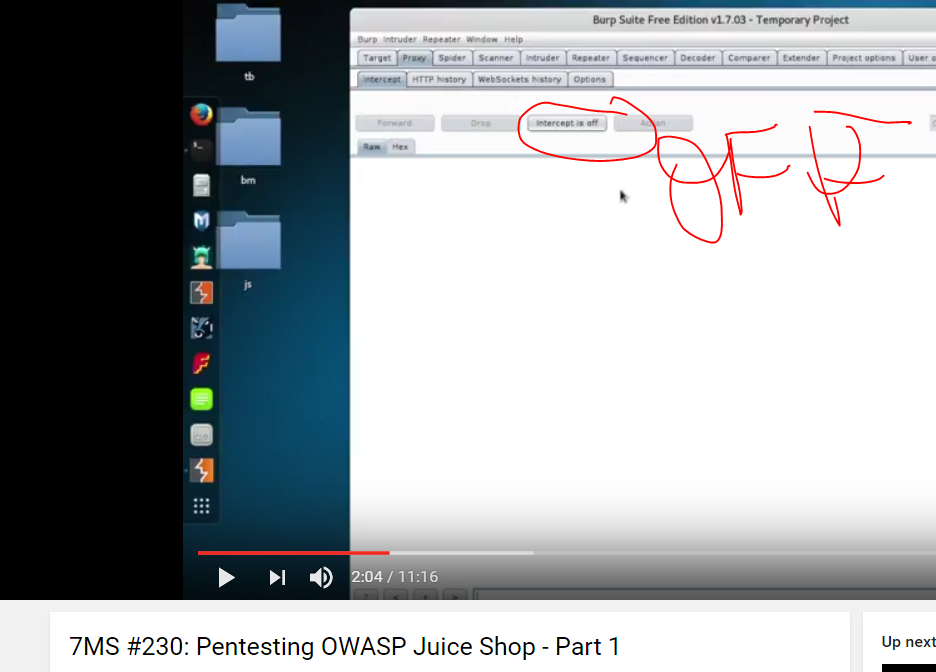
Pentesting OWASP Juice Shop - step by step from Brian Johnson


Describe how network policies are processed by writing the high-level steps of processing network policies.

Lab Challenge
Processing Network Policies
Overview

To complete this challenge, you will describe how network policies are processed by writing the high-level steps of processing network policies.
Mindset
During this lab, you started to use NPS policies, specifically the Connection Request policies, and Network Policies. Although the connection request policy specified settings for the RADIUS server, the network policy will allow or disallow the remote access.
Completion time
10 minutes

What are the steps used when processing network policies?
1.      In the NPS console tree, double-click Policies, and then click Network Policies
2.      Right-click Network Policies, and then click new.
3.      Under Policy Name, type a name for the network policy
4.      Under Type of network access server, select Remote Access Server (VPN-Dial up),
5.      click next. On the Specify Conditions page, click Next. In Select condition,
6.      click Policy Expiration, and then add a specified date and time when the policy expires, click Ok. Click next,
7.      On the Specify Access Permission, with access granted selected, choose Access is determined by User Dial-in properties (which override NPS policy.) On configure Authentication Methods, select next, On configure constraints, select next
8.      On configure settings, select next Click next, and then click Finish.
End of the lab. You can log off or start a different lab. If you want to restart this lab, you’ll need to click the End Lab button in order for the lab to be reset.
Lab Challenge
Processing Network Policies
Overview

To complete this challenge, you will describe how network policies are processed by writing the high-level steps of processing network policies.
Mindset
During this lab, you started to use NPS policies, specifically the Connection Request policies, and Network Policies. Although the connection request policy specified settings for the RADIUS server, the network policy will allow or disallow the remote access.
Completion time
10 minutes


What are the steps used when processing network policies?

1.   The operator attempts to initiate a remote access connection.
2.    Remote Access server checks the conditions in the first configured NPS network policy.
3.    If the conditions of this NPS network policy do not match, the Remote Access server checks the next configured NPS network policy. It keeps checking each policy until it finds a match or reaches the last policy.
4.    Once the Remote Access Server finds an NPS network policy with conditions that match the incoming connection attempt, the Remote Access server checks any constraints (such as time of day or minimum encryption level) that have been configured for the policy.
5.    If the connection attempt does not match any configured constraints, the Remote Access Server denies the connection.
6.    If the connection attempt matches both the conditions and the constraints of a particular NPS network policy, the remote access server will allow or deny the connection, based on the Access Permissions configured for that policy.


Add Workstation Authentication Certificates to All Workstations

Lab Challenge      Add Workstation Authentication Certificates to All Workstations

Overview----To complete this challenge, you will demonstrate how to add workstation authentication certificates to all workstations by writing the steps to complete the tasks described in the scenario.
Mindset-----You decide to use RADIUS for your organization. To ensure a secure environment, you decide to use digital certificates. How would you automatically add workstation authentication certificates to all client computers within your Company?
Completion time  15 minutes

Write out the steps you performed to complete the challenge.

1. On the Certificate Authority server, open server manager, open certificate authority under Tools, right-click on Certificate Templates and select Manage.

2. Right-click on the Workstation Authentication template and select Duplicate Template.
On the General tab enter the new name_(Newname) for the certificate template.
3. On the Security tab, under Group or user names, click Domain Computers and under Allow select the Enroll and Autoenroll permission check boxes. Select OK and close the Properties of New Template and close the Certificate Templates console.

4. From the Certificate Authority console right-click Certificate Templates, select New and select Certificate Template to Issue. Click the certificate template that was just configured and click OK. Close the Certificate Authority console.

5. In server manager, open the Group Policy Management console, right-click the Default Domain Policy and select Edit. Go to Computer Configuration\Policies\Windows Settings\Security Settings\Public Key Policies.

6. Double-click Certificate Services Client - Auto-Enrollment, select Enabled for the configuration model.

7. Select Renew expired certificates, update pending certificates, remove revoked certificates, and Update certificates that use certificate templates check boxes. Click OK to close the dialog box.

References:


Monday, July 24, 2017

AJAX Essentials


In This Chapter
  Understanding AJAX
  Using JavaScript to manage HTTP requests
  Creating an XMLHttpRequest object
  Building a synchronous AJAX request
  Retrieving data from an AJAX request
  Managing asynchronous AJAX requests

If you have been following the Web trends, you have no doubt heard of AJAX. This expertise has generated a lot of interest. Depending on whom you listen to, it is either going to change the Internet or it is a lot of overblown hype. In this mini-book, I show you what AJAX really is, how to use it, and how to use a particular AJAX library to supercharge your Web pages.
The first thing is to figure out exactly what AJAX is and what it is not. It is not:
A programming language: It isn’t one more language to learn along with the many others you encounter.
New: Most of the technology used in AJAX isn’t really all that new; it’s the way the technology’s being used that’s different.
Remarkably different: For the most part, AJAX is about the same things you’ll see in the rest of this book: building compliant Web pages that interact with the user.
So you’ve got to be wondering why people are so excited about AJAX. It’s a relatively simple thing, but it has the potential to change the way people think about Internet development. Here’s what it really is:

Direct control of client-server communication: Rather than the automatic communication between client and server that happens with Websites and server-side programs, AJAX is about managing this relationship more directly.
Use of the XMLHttpRequestobject: This is a special object that has been built into the DOM[E1]  of all major browsers for some time, but it was not used heavily. The real innovation of AJAX was finding creative (perhaps unintentional) uses for this heretofore virtually unknown utility.


A closer relationship between client-side and server-side programming: Up to now, client-side programs (usually JavaScript) did their own thing, and server-side programs (PHP) operated without too much knowledge of each other. AJAX helps these two types of programming work together better.
A series of libraries that facilitate this communication: AJAX isn’t that hard, but it does have a lot of details. Several great libraries have sprung up to simplify using AJAX technologies. You’ll find AJAX libraries for both client-side languages like JavaScript, and server-side languages like PHP.
Let’s say you’re making an online purchase with a shopping cart mechanism. In a typical (pre-AJAX) system, an entire Web page is downloaded to the user’s computer. There may be a limited amount of JavaScript-based interactivity, but anything that requires a data request needs to be sent back to the server. For example, if you’re on a shopping site and you want more information about that fur-lined fishbowl you’ve had your eye on, you might click on the “more information” button. This causes a request to be sent to the server, which builds an entire new Web page for you containing your new request. Every time you make a request, the system builds a whole new page on the fly. The client and server have a long-distance relationship.
In the old days when you wanted to manage your Web site’s content, you had to refresh each Web page — time-consuming to say the least. However, with AJAX, you can update the content on a page without refreshing the page[1]. Instead of the server sending an entire page response just to update a few words on the page,
 the server just sends the words you want to update and nothing else[2].
If you’re using an AJAX-enabled shopping cart, you might still click on the fish bowl image. An AJAX request goes to the server and gets information about the fish bowl, which is immediately placed in the current page, without requiring a complete page refresh.
AJAX technology allows you to send a request to the server, which can then change just a small part of the page. With AJAX, you can have a whole bunch of smaller requests happening all the time, rather than a few big ones that rebuild the page in large distracting flurries of activity.
To the user, this makes the Web page look more like traditional applications. This is the big appeal of AJAX: It allows Web applications to act more like desktop applications, even if these Web applications have complicated features like remote database access. Google’s Gmail was the first major application to use AJAX, and it blew people away because it felt so much like a regular application inside a Web browser[3].

AJAX Spelled Out

Technical people love snappy acronyms. There’s nothing more intoxicating than inventing a term. AJAX is one term which has taken on a life of its own. Like many computing acronyms, it may be fun to say, but it doesn’t really mean much. AJAX stands for Asynchronous JavaScript And XML. Truthfully, these terms were probably chosen to make a pronounceable acronym rather than for their accuracy or relevance to how AJAX works.


A is for asynchronous

An asynchronous transaction (at least in AJAX terms) is one in which more than one thing can happen at once. For example, you can make an AJAX call process a request while the rest of your form is being processed. AJAX requests do not absolutely have to be asynchronous, but they usually are. When it comes to Web design, asynchronous means that you can independently send and receive as many different requests as you want. Data may start transmitting at any time without having any effect on other data transmissions. You could have a form that saves each field to the database as soon as it’s filled out. Or perhaps a series of drop-down lists that generates the next drop-down list based upon the value you just selected. (It’s OK if this doesn’t make sense right now. It’s not an important part of understanding AJAX, but vowels are always nice in an acronym.)

In this chapter, I show you how to do both synchronous and asynchronous versions of AJAX.

J is for JavaScript ---- If you want to make an AJAX call, you simply write some JavaScript code that simulates a form. You can then access a special object hidden in the DOM (the XMLHttpRequestobject) and use its methods to send that request to the user. Your program acts like a form, even if there was no form there. In that sense, when you’re writing AJAX code, you’re really using JavaScript. Of course, you can also use any other client-side programming language that can speak with the DOM, including Flash and (to a lesser extent) Java. JavaScript is the dominant technology, so it’s in the acronym.
A lot of times, you also use JavaScript to decode the response from the AJAX request.
A is for . . . and?
I think it’s a stretch to use “and” in an acronym, but AJX just isn’t as cool as AJAX. I guess they didn’t ask me.


And X is for . . . data
The X is for XML, which is one way to send the data back and forth from the server.
Since the object we’re using is the XMLHttpRequestobject, it makes sense that it requests XML. It can do that, but it can also get any kind of text data. You can use AJAX to retrieve all kinds of things:
Plain old text: Sometimes you just want to grab some text from the server. Maybe you have a text file with a daily quote in it or something.
Formatted HTML: You can have text stored on the server as a snippet of HTML/XHTML code and use AJAX to load this page snippet into your browser. This gives you a powerful way to build a page from a series of smaller segments. You can use this to reuse parts of your page (say headings or menus) without duplicating them on the server.
XML data: XML is a great way to pass data around. (That’s what it was invented for.) You might send a request to a program that goes to a data-base, makes a request, and returns the result as XML.
JSON data: A new standard called JSON (JavaScript Object Notation) is emerging as an alternative to XML for formatted data transfer. It has some interesting advantages.
Making a Basic AJAX Connection
AJAX uses some technical parts of the Web in ways that may be unfamiliar to you. Read through the rest of this chapter so you know what AJAX is doing, but don’t get bogged down in the details. Nobody does it by hand!
(Except people who write AJAX libraries or books about using AJAX.) In Chapter 2 of this minibook I show a library that does all the work for you. If all these details are making you misty-eyed, just skip ahead to the next chapter and come back here when you’re ready to see how all the magic works. The basic AJax.html program shown in Figure 1-1 illustrates AJAX at work. When the user clicks on the link, a small pop-up shown in Figure 1-2 appears.

If you don’t get the joke, you need to go rent Monty Python and the Holy Grail[i]. It’s part of the geek culture. Trust me. In fact, you should really own a copy.
It’s very easy to make JavaScript pop up a dialog, but the interesting thing here is where that text comes from. The data is stored on a text file on the server. Without AJAX, there is no easy way to get data from the server without reloading the entire page.


You might claim that HTML frames allow you to pull data from the server, but frames have been deprecated in XHTML because they cause a lot of other problems. You can use a frame to load data from the server, but you can’t do all the other cool things with frame-based data that you can with AJAX. Even if frames were allowed, AJAX is a much better solution most of the time.  You won’t be able to run this example straight from the CD-ROM. Like PHP, AJAX requires a server to work properly. If you want to run this program, put it in a subdirectory of your server and run it through localhost as you do for PHP programs.

This particular example uses a couple of shortcuts to make it easier to understand:

It isn’t fully asynchronous. The program will pause while it retrieves data. As a user, you won’t even notice this, but as you’ll see, this can have a serious drawback. It’s a bit simpler, so I start with this example and then extend it to make the asynchronous version.
It isn’t completely cross-browser-compatible. The AJAX technique I use in this program works fine for IE 7 and all versions of Firefox (and most other standards-compliant browsers). It does not work correctly in IE 6 and earlier. I recommend you use jQuery or another library (described in Chapter 2 of this minibook) for cross-browser compatibility.

Look over the code, and you’ll find it reasonable enough:

<!DOCTYPE html PUBLIC
“-//W3C//DTD XHTML 1.0 Strict//EN”
“http://www.w3.org/TR/xhtml1/DTD/xhtml1-strict.dtd”>
<html lang = “EN” xml:lang = “EN” dir = “ltr”>
<head>
<meta http-equiv=”content-type” content=”text/xml; charset=utf-8” />

<title>Basic AJAX</title>
<script type = “text/javascript”>
//<![CDATA[

function getAJAX(){
var request = new XMLHttpRequest();
request.open(“GET”, “beast.txt”, false);
request.send(null);

if (request.status == 200){
//we got a response – por que 200 significa a conexão estabelecida.
alert(request.responseText);
} else {
//something went wrong
alert(“Error- “ + request.status + “: “ + request.statusText);
} // end if
} // end function
//]]>

</script>

</head>

<body>
<h1>Basic AJAX</h1>

<form action = “”>
<p>
<button type = “button”
onclick = “getAJAX()”>
Summon the vicious beast of Caerbannog
</button>
</p>
</form>

</body>
</html>

Building the HTML form
You don’t absolutely need an HTML form for AJAX, but I have a simple one here. Note that the form is not attached to the server in any way.
<form action = “”>
<p>
<button type = “button”
onclick = “getAJAX()”>
Summon the vicious beast of Caerbannog
</button>
</p>
</form>

This code uses a button, and the button is attached to a JavaScript function called getAJAX().

All you really need is some kind of structure that can trigger a JavaScript function.

AJAX isn’t a complex technology, but it does draw on several other technologies. You may need to look over the JavaScript chapters in Book IV if this material is unfamiliar to you. Although these examples don’t require PHP, they do involve server-side responses like PHP does, so AJAX is usually studied by people already familiar with both JavaScript and PHP.[4]

HTML XHTML and CSS All-in-One Desk Reference for Dummies 


[1] AJAX, você pode atualizar o conteúdo em uma página sem atualizar a página.
[2] O servidor apenas envia as palavras que deseja atualizar e nada mais.
[3] O Gmail do Google foi o primeiro aplicativo importante a usar o AJAX, e isso despertou as pessoas porque se tinha a sensação de estar usando um aplicativo  dentro de um navegador da Web.
[4] Então AJAX geralmente é estudado por pessoas que já estão familiarizadas com JavaScript e PHP.


 [E1]DOM (Document Object Model)