
Showing posts with label Professor_Messer. Show all posts
Showing posts with label Professor_Messer. Show all posts
Wednesday, May 31, 2017
Wednesday, April 19, 2017
Firewall rules
Firewall is usually represented as a block wall, and so forth. But we have in Nashville it looks like three virtual LANs, one for servers, one for wireless, and another for our users. On our firewall, we have a publically accessible web server, and we have maybe some internet connections/WAN connection to our Knoxville branch office, which evidently is much smaller because we have only two virtual local area networks, one for servers and one for users. Visio is especially cool because you can do ultra-detailed network diagrams.

Firewall: Spend $50 for a Network Address Translator firewall device; it’s likely to be good enough in default mode. On your laptop, use personal firewall software. If you can, hide your IP address. There’s no reason to allow any incoming connections from anybody. • Encryption: Install an e-mail and file encryptor (like PGP or TrueCrypt). Encrypting all your e-mail or your entire hard drive is unrealistic, but some mail is too sensitive to send in the clear. Similarly, some files on your hard drive are too sensitive to leave unencrypted. [2008 update: Full disk encryption is now easy, and you won’t notice any latency. Do it.] None of the measures I’ve described are foolproof. If the secret police want to target your data or your communications, no countermeasure on this list will stop them. But these precautions are all good network-hygiene measures, and they’ll make you a more difficult target than the computer next door. And even if you only follow a few basic measures, you’re unlikely to have any problems. I’m stuck using Microsoft Windows and Office, but I use Opera for Web browsing and Eudora for e-mail. I use Windows Update to automatically get patches and install other patches when I hear about them. My antivirus software updates itself regularly. I keep my computer relatively clean and delete applications that I don’t need. I’m diligent about backing up my data and about storing data files that are no longer needed offline. I’m suspicious to the point of near-paranoia about e-mail attachments and websites. I delete cookies and spyware. I watch URLs to make sure I know where I am, and I don’t trust unsolicited e-mails. I don’t care about low-security passwords, but try to have good passwords for accounts that involve money. I still don’t do Internet banking. I have my firewall set to deny all incoming connections. And I turn my computer off when I’m not using it. That’s basically it. Really, it’s not that hard. The hardest part is developing an intuition about e-mail and websites. But that just takes experience.
Schneier on Security

Firewall: Spend $50 for a Network Address Translator firewall device; it’s likely to be good enough in default mode. On your laptop, use personal firewall software. If you can, hide your IP address. There’s no reason to allow any incoming connections from anybody. • Encryption: Install an e-mail and file encryptor (like PGP or TrueCrypt). Encrypting all your e-mail or your entire hard drive is unrealistic, but some mail is too sensitive to send in the clear. Similarly, some files on your hard drive are too sensitive to leave unencrypted. [2008 update: Full disk encryption is now easy, and you won’t notice any latency. Do it.] None of the measures I’ve described are foolproof. If the secret police want to target your data or your communications, no countermeasure on this list will stop them. But these precautions are all good network-hygiene measures, and they’ll make you a more difficult target than the computer next door. And even if you only follow a few basic measures, you’re unlikely to have any problems. I’m stuck using Microsoft Windows and Office, but I use Opera for Web browsing and Eudora for e-mail. I use Windows Update to automatically get patches and install other patches when I hear about them. My antivirus software updates itself regularly. I keep my computer relatively clean and delete applications that I don’t need. I’m diligent about backing up my data and about storing data files that are no longer needed offline. I’m suspicious to the point of near-paranoia about e-mail attachments and websites. I delete cookies and spyware. I watch URLs to make sure I know where I am, and I don’t trust unsolicited e-mails. I don’t care about low-security passwords, but try to have good passwords for accounts that involve money. I still don’t do Internet banking. I have my firewall set to deny all incoming connections. And I turn my computer off when I’m not using it. That’s basically it. Really, it’s not that hard. The hardest part is developing an intuition about e-mail and websites. But that just takes experience.
Schneier on Security


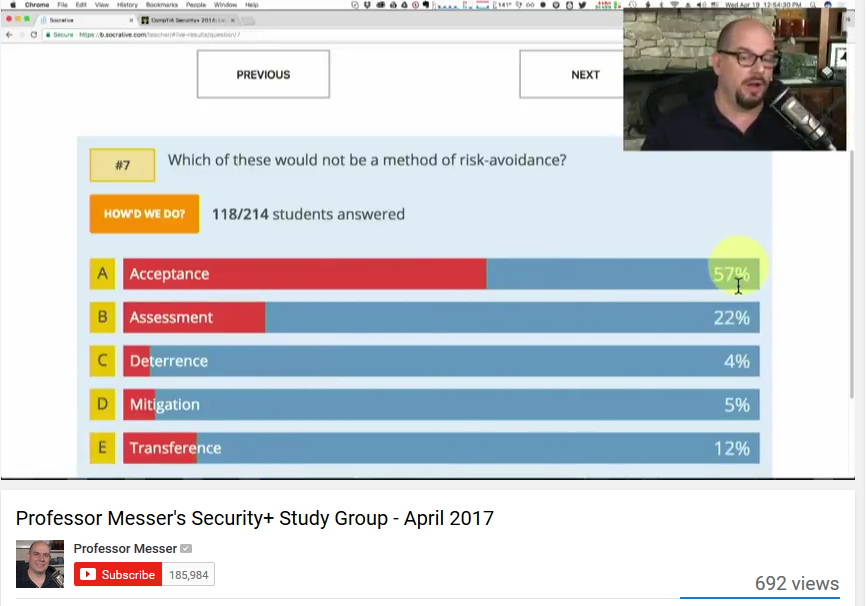
Risk avoidance
Risk avoidance is aimed at preventing the risk from actually occurring. Information security has three standard components: prevention, detection, and response. The prevention element and all it involves are examples of risk avoidance. Training programs, which are designed to increase the ability of employees to recognize and respond to incidents, are good examples of this type of risk handling approach. The information security process is heavily geared toward avoidance in order to reduce, as much as possible, the amount of harm by addressing the risk directly. The last two components of the information security process, detection, and response are embodied in the risk mitigation and risk transference approaches. In the case of risk transference, the response requires an outside party to assume the impact of the risk. Insurance is a prime example of this type of assumption.
Anne Kohnke • Ken Sigler • Dan Shoemaker
Implementing Cybersecurity INTERNAL AUDIT AND I T AU D I T S E R I E S
A Guide to the National Institute of Standards and Technology Risk Management Framework


Anne Kohnke • Ken Sigler • Dan Shoemaker
Implementing Cybersecurity INTERNAL AUDIT AND I T AU D I T S E R I E S
A Guide to the National Institute of Standards and Technology Risk Management Framework

TOTP
A TIME-BASED ONE-TIME PASSWORD ALGORITHM (TOTP)
The Time-based One-time Password (TOTP) algorithm is an IETF draft standard proposed by
OATH. It is based on a synchronized clock between the user and server.
TOTP = HOTP (K, T)
◾ K: a shared secret between client and server
◾ T: an integer that represents the number of time steps between the initial counter time
T0 and the current Unix time, or POSIX time, i.e., the number of seconds elapsed since
the midnight Coordinated Universal Time (UTC) of January 1, 1970
The standard Unix time t, which is the data type that represents a point in time, is a signed integer data type of 32 bits. 32 bits, of which one bit is the sign bit, can cover a range of about 136 years
in total. The minimum time represented is 1901-12-13, and the maximum time represented is 2038-
01-19. In contrast, the Network Time Protocol, specified in RFC 1305, is the most commonly used
Internet time protocol, and the one that provides the best performance. Computers include NTP
client software in their operating systems and periodic synchronization is provided by Network
Time Protocol (NTP) servers, such as time-a.nist.gov. NTP servers use UDP on port 123. The 64-bit
timestamps used by NTP consist of a 32-bit seconds part and a 32-bit fractional seconds part, giv-
ing NTP a time scale of 232 seconds (136 years) and a theoretical resolution of 2−32 seconds (233
picoseconds). The NTP timescale wraps around every 232 seconds (136 years). NTP uses an epoch
of January 1, 1900, so the first rollover will occur in 2036, well before the familiar UNIX Year 2038.
More specifically T = (Current Unix time – T0)/X
◾ X represents the time step in seconds (default value X = 30 seconds)
◾ T0, the Unix epoch, is the time 00:00:00 UTC on 1 January 1970 (or 1970-01-01T00:00:00Z
ISO 8601) to start counting time steps (default value is 0, Unix epoch)
Resynchronization of the clock is necessary because of possible clock drifts between a client and a validation server. It is recommended that the validator be set with a specific limit for the number of time steps that a verifier can be ‘out of synch’ before being not validated or rejected. This limit can be set both forward and backward from the calculated time step on receipt of the OTP value. If the time step is 30 seconds as recommended, and the validator is set to only accept 2 time steps backward, then the maximum elapsed time drift would be around 89 seconds, i.e., 29 seconds in the calculated time step and 60 for two backward time steps.
Introduction.to.Computer.Networks.and.Cybersecurity.2013
Chwan-Hwa (John) Wu
J. David Irwin
• TOTP - Time-based One-Time Password
• Use a secret key and the time of day
• Secret key is configured ahead of time
• Timestamps are synchronized via NTP
• Timestamp usually increments every 30 seconds
• Put in your username, password, and TOTP code
• One of the more common OTP methods
• Used by Google, Facebook, Microsoft, etc.
Professor Messer

The Time-based One-time Password (TOTP) algorithm is an IETF draft standard proposed by
OATH. It is based on a synchronized clock between the user and server.
TOTP = HOTP (K, T)
◾ K: a shared secret between client and server
◾ T: an integer that represents the number of time steps between the initial counter time
T0 and the current Unix time, or POSIX time, i.e., the number of seconds elapsed since
the midnight Coordinated Universal Time (UTC) of January 1, 1970
The standard Unix time t, which is the data type that represents a point in time, is a signed integer data type of 32 bits. 32 bits, of which one bit is the sign bit, can cover a range of about 136 years
in total. The minimum time represented is 1901-12-13, and the maximum time represented is 2038-
01-19. In contrast, the Network Time Protocol, specified in RFC 1305, is the most commonly used
Internet time protocol, and the one that provides the best performance. Computers include NTP
client software in their operating systems and periodic synchronization is provided by Network
Time Protocol (NTP) servers, such as time-a.nist.gov. NTP servers use UDP on port 123. The 64-bit
timestamps used by NTP consist of a 32-bit seconds part and a 32-bit fractional seconds part, giv-
ing NTP a time scale of 232 seconds (136 years) and a theoretical resolution of 2−32 seconds (233
picoseconds). The NTP timescale wraps around every 232 seconds (136 years). NTP uses an epoch
of January 1, 1900, so the first rollover will occur in 2036, well before the familiar UNIX Year 2038.
More specifically T = (Current Unix time – T0)/X
◾ X represents the time step in seconds (default value X = 30 seconds)
◾ T0, the Unix epoch, is the time 00:00:00 UTC on 1 January 1970 (or 1970-01-01T00:00:00Z
ISO 8601) to start counting time steps (default value is 0, Unix epoch)
Resynchronization of the clock is necessary because of possible clock drifts between a client and a validation server. It is recommended that the validator be set with a specific limit for the number of time steps that a verifier can be ‘out of synch’ before being not validated or rejected. This limit can be set both forward and backward from the calculated time step on receipt of the OTP value. If the time step is 30 seconds as recommended, and the validator is set to only accept 2 time steps backward, then the maximum elapsed time drift would be around 89 seconds, i.e., 29 seconds in the calculated time step and 60 for two backward time steps.
Introduction.to.Computer.Networks.and.Cybersecurity.2013
Chwan-Hwa (John) Wu
J. David Irwin
• TOTP - Time-based One-Time Password
• Use a secret key and the time of day
• Secret key is configured ahead of time
• Timestamps are synchronized via NTP
• Timestamp usually increments every 30 seconds
• Put in your username, password, and TOTP code
• One of the more common OTP methods
• Used by Google, Facebook, Microsoft, etc.
Professor Messer

Tuesday, April 18, 2017


Subscribe to:
Posts (Atom)